Due Today: It's time for Data Confirmation!
 Data Confirmation through Aeries is what we do annually instead of filling out a packet of documents.
It is required to complete for each of your students once a year.
Please complete your student's data confirmation before the first day of school TOMORROW, Wednesday, Aug. 12th.
1. Go to Aeries and log on.
https://wrightesd.asp.aeries.net/Student/LoginParent.aspx
Use Forgot Password? if you don't remember your password. Use the email that we have on file for you.
Note to new WESD parents: This is not the same as the Aeries account for enrolling a student. However, you do have an account automatically. Just use Forgot Password? to create a password.
2. Click on the Data Confirmation banner in yellow. Or, look under Student Information and then Data Confirmation.
You will complete each of the following steps. Click the green CONTINUE button to move to the next step.
Note: If you have more than one student in the WESD district, click on your child's name at the top for a drop-down of all your students.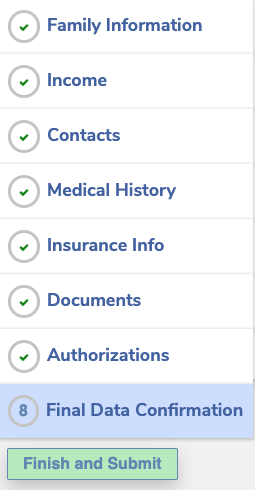 3. If you have any questions, please contact llockett@wrightesd.org or your school's main office.
Wright Elementary School
Call 707-542-0556
Text 707-217-8685
Email wesoffice@wrightesd.org
Robert L. Stevens
Call 707-575-8883
Text 707-217-9860
Email rlsoffice@wrightesd.org
JX Wilson
Call 707-525-8350
Text 707-217-8902
Email jxwoffice@wrightesd.org